Trusting an AI assistant starts with what you need it for
You probably don’t need the same level of trust for a dinner-plan brainstorm as you do for a legal letter, a medical decision, or a message to your boss. The first step is naming what “good enough” looks like for the task: speed, creativity, accuracy, completeness, or tone. An assistant can be very useful even when it’s not perfectly reliable, as long as the cost of being wrong is low.
A practical way to decide is to ask two questions before you paste anything in: what happens if this answer is wrong, and who is accountable for the result. If the downside is minor, you can treat the output like a rough draft. If the downside is real money, safety, reputational harm, or private data exposure, the assistant becomes a starting point—not a source you rely on without checks.
What an AI assistant is actually doing when it answers

When you ask an AI assistant a question, it isn’t “looking up” the truth in the way a person would. Most of the time, it’s generating a likely-sounding response based on patterns in its training data and whatever context you gave it in the chat. It’s excellent at producing coherent language and connecting related ideas, but that coherence can be mistaken for certainty.
That also explains why small changes in your prompt can change the answer. If you provide a few constraints (“keep it under 120 words,” “use a friendly tone,” “assume I’m in the U.S.”), the model will optimize for those signals alongside factual accuracy. If you omit key details, it will often fill gaps with reasonable-sounding defaults—sometimes correctly, sometimes not.
Some assistants can browse the web or call tools, but many answers are still produced without verifying against current sources. Even when tools are available, you may have to ask for citations or a step-by-step rationale. The system is fast and fluent, but it can’t reliably tell you when it’s guessing unless you build that expectation into how you use it.
Common failure modes: hallucinations, outdated info, and hidden assumptions
You’ll notice three failure modes that show up in everyday use. The first is hallucination: the assistant produces a confident-sounding detail that isn’t supported—like a fake citation, a misquoted policy, or a “feature” that doesn’t exist. It often happens when you ask for specifics (names, dates, numbers) and don’t provide a source to anchor the answer, or when the model tries to be helpful rather than admit uncertainty.
The second is outdated information. Even if the answer is plausible, it may reflect last year’s pricing, last month’s guidelines, or an old version of a product. This bites hardest with fast-changing topics like software steps, benefits rules, school policies, and anything tied to “current” events. A practical constraint is time: verifying every detail can erase the speed advantage, so you have to choose what’s worth checking.
The third is hidden assumptions. If you don’t specify your location, timeframe, audience, budget, or constraints, the assistant will quietly pick defaults. That can turn “write an email” into the wrong tone for your workplace, or “what should I do” into advice that ignores your actual risk tolerance. When the output feels slightly off, it’s often the unstated assumptions—not the writing quality—that need fixing.
High-stakes vs low-stakes: where trust breaks quickly
You can feel the difference between low-stakes and high-stakes use in a normal day. Asking for a few meeting icebreakers, a workout plan, or three ways to rephrase a sentence is mostly reversible: if the suggestion is mediocre, you lose a little time. In these cases, the assistant is often best treated like a creative coworker—useful for options, structure, and wording, but not “right.”
Trust breaks quickly when the output can trigger an irreversible decision or a chain reaction you can’t easily unwind. Medical symptoms, legal language, tax moves, HR situations, financial commitments, safety procedures, and anything involving minors or sensitive personal data all belong in a higher-stakes bucket. The same hallucinated detail that’s harmless in a travel itinerary can become expensive in a contract clause or dangerous in a medication-related answer. The accountability question matters here: if you’re the one signing, sending, or acting, you’re also the one owning the consequences.
A practical rule is to raise your verification standard as soon as the cost of being wrong is more than “annoying.” That may mean checking primary sources, confirming dates, or getting a qualified human review. It takes time and sometimes money, but that cost is often smaller than the cost of a confident mistake.
Data privacy and confidentiality: what you may be giving away
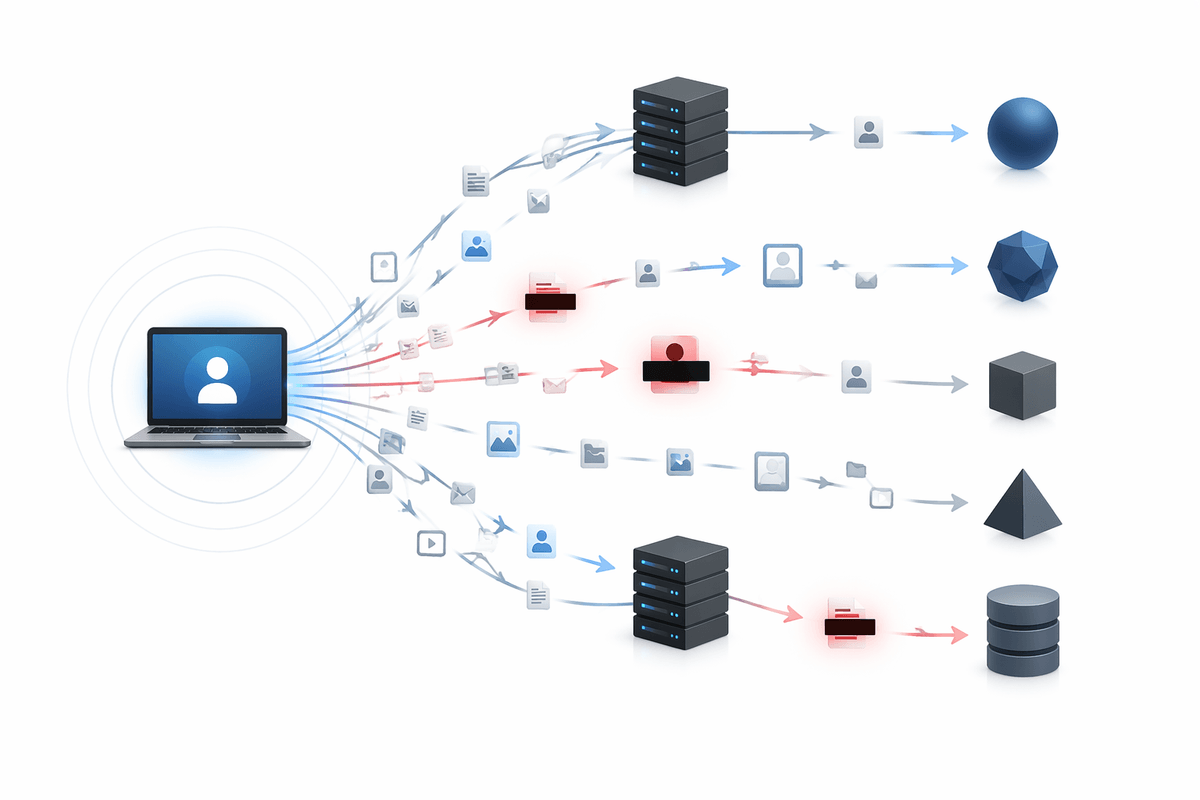
You’ve probably copied something into an assistant that you wouldn’t post publicly: a draft performance review, a customer complaint, a contract excerpt, a medical note, or a screenshot with names and numbers. The risk isn’t only that the answer is wrong—it’s that you’ve created an extra place where sensitive information exists, gets logged, or gets seen by people and systems you don’t control. Even “harmless” context (job title, city, project name) can be enough to identify a person or company when combined.
Privacy settings help, but they rarely turn a consumer tool into a sealed vault. Depending on the product and your account type, your chats may be stored for a period, used to improve models, reviewed for safety, or shared with vendors that run parts of the service. That’s not automatically bad, but it changes what “confidential” means in practice.
A workable habit is to treat assistants like a conference room with thin walls: remove names, account numbers, addresses, and unique identifiers; summarize instead of pasting raw documents; and use placeholders. If you truly need to process sensitive material, the constraint is cost and setup—paid enterprise plans, self-hosted tools, or approved internal systems may be necessary to meet real confidentiality obligations.
How to evaluate an assistant’s answers without becoming an expert
A polished response isn't always a reliable one. Some answers read confidently while leaving no clear trail back to the evidence behind them. One of the quickest ways to probe that confidence is to ask, "Under what conditions would this be wrong?" A grounded explanation should be able to identify its own assumptions and limits. For factual topics, request specific sources, publication dates, and key definitions in plain language. When those details are vague or missing, treat that as a signal to look more closely rather than a harmless omission.
Verification doesn't have to be exhaustive to be effective. Select two or three concrete claims—a figure, a procedural step, or a stated requirement—and compare them with a primary source or an official publication. If the assistant cannot point to the exact policy name, form, settings page, or organization document supporting its answer, there's a good chance it is generalizing from patterns instead of citing authoritative information. That level of confidence may be perfectly acceptable for brainstorming or drafting, but it deserves much more scrutiny when legal requirements, technical procedures, or compliance decisions are involved.
Another useful test is consistency under changing assumptions. Ask for the same answer from a different angle, request alternative approaches, or introduce a competing assumption and see how the reasoning changes. A well-supported response should explain why the conclusion shifts instead of quietly producing a different recommendation. Since thorough verification takes time, reserve the deepest review for information that will influence decisions, appear in published work, or be shared with people who will rely on its accuracy.
Practical trust rules: workflows that keep you in control
You’ll stay in control if you treat the assistant like a fast draft engine with a checklist, not a judge. Start by stating the decision you’re making, your constraints, and the “must not be wrong” details (dates, amounts, names, rules). Then ask it to separate output into: facts it’s unsure about, assumptions it made, and what it would verify first.
Build a simple workflow: use AI to outline, rephrase, compare options, and generate questions; use primary sources to confirm any claim that could cost money, break policy, or harm someone; then do a final human pass for tone and confidentiality. The main cost is friction—these steps add minutes—so apply them hardest where you’ll sign, send, publish, or pay.